
Under the Hood: The Architecture of Pingdo
Next.js, Layer 7 Diagnostics, and Real-Time Visualization
1. The Browser as a Network Probe: High-Resolution Timing
Precision is the enemy of the standard JavaScript Date.now() object, which is susceptible to system clock drift and non-monotonic adjustments (e.g., NTP updates). To measure network latency with industrial accuracy, Pingdo leverages the High Resolution Time Level 2 standard.
/* BAD: Susceptible to system clock skewconst start = Date.now() */ ; /* GOOD: Monotonic, microsecond precisionconst start = performance.now() */ ; await fetch('/api/ping');const duration = performance.now() - start; Figure 1: Navigation Timing API vs Standard Date Object
2. Layer 3 vs. Layer 7: The "Application Penalty"
Standard networking tools like ping (ICMP) and traceroute (UDP) operate at Layer 3/4. They are fast but misleading. They tell you if the wire is working, not if the application is working.
Pingdo operates at Layer 7 (HTTP/HTTPS). This means every "ping" on this site incurs the full cost of the modern web stack. This is intentional. By measuring the full round-trip of an HTTPS request, we capture the "Application Experience" rather than just the "Wire Speed."
The Anatomy of an HTTPS Ping
- 1. DNS Lookup ~20ms (Cached: ~1ms)
- 2. TCP Handshake (SYN, SYN-ACK, ACK) 1x RTT
- 3. TLS 1.3 Negotiation 1x RTT
- 4. HTTP HEAD Request (The "Ping") 1x RTT + Server Processing
3. Real-Time Telemetry: Navigating Constraints
To achieve the smooth "Heart Monitor" visualization you see on the dashboard, we cannot open a new TCP connection for every point. That would flood the browser's connection pool (MAX_CONNS_PER_DOMAIN is typically 6).
Instead, Pingdo uses a hybrid approach:
- Initial Burst: HTTP/2 Multiplexing is used to send parallel HEAD requests for rapid convergence.
- Sustained Monitoring: We utilize Keep-Alive headers to reuse the existing TCP connection, eliminating the handshake overhead for subsequent pings. This brings the Layer 7 "Ping" much closer to the raw wire speed.
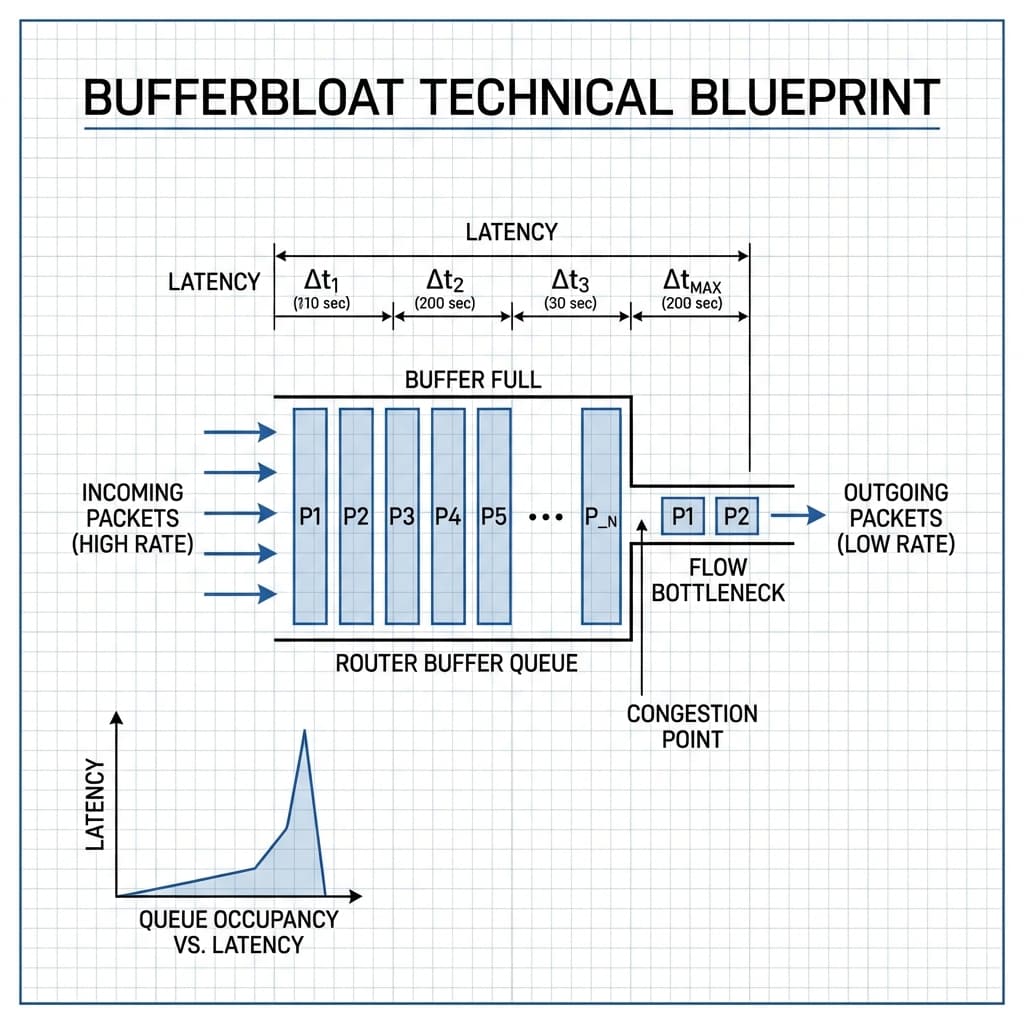
Bufferbloat & Queuing Dynamics
Narrative: High ingress traffic saturating the egress buffer.
Engineering Insight: When ingress traffic consistently exceeds the egress processing rate, the buffer builds up. This increases the total latency (). Once the buffer is full, Tail Drop occurs, leading to packet loss.
4. Visualization Physics
Data without context is noise. Pingdo implements a dynamic SVG-based visualization engine using standard deviation to smooth out micro-spikes caused by local CPU scheduling (garbage collection), presenting a true representation of Jitter.
We use a Ring Buffer data structure to store the last 50 points of latency data. This O(1) insertion ensures that the animation remains pegged at 60fps even on low-power mobile devices.
5. The Future: eBPF and Beyond Browser Sandboxes
While the Performance Timeline API allows us to achieve remarkable precision within the browser, we are approaching the theoretical limits of what is possible inside a sandboxed environment. The future of network diagnostics lies in eBPF (Extended Berkeley Packet Filter) technology.
Pingdo is currently prototyping a native agent that utilizes eBPF to attach probes directly to the kernel's TCP/IP stack. This allows for:
- Zero-Overhead Monitoring: Inspecting every packet without copying data to user space.
- TCP Window Tracking: Real-time visibility into the congestion window (cwnd) and slow-start threshold (ssthresh).
- Retransmission Analysis: Distinguishing between fast retransmits and timeout-based retransmits.
Until these technologies become accessible via WebAssembly (WASM), Pingdo's Layer 7 approach remains the gold standard for client-side diagnostic accessibility, offering a perfect balance between precision and ubiquity.