
Under the Hood: The Architecture of Pingdo
Next.js, Layer 7 Diagnostics, and High-Resolution Telemetry
1. The Browser as a Sensor: High-Resolution Timing
To measure network latency with industrial accuracy within a sandboxed browser environment, we must bypass the inaccuracies of the standard system clock.
performance.now() vs Date.now()
The standard Date.now() returns an integer representing milliseconds since the Unix epoch. However, it is not monotonic; if an NTP sync occurs or a user manually changes their clock, Date.now() can jump forward or backward, corrupting latency measurements.
Pingdo utilizes the High Resolution Time API (performance.now()), which provides a sub-millisecond timestamp relative to the navigation start. It is monotonic and immune to system clock adjustments.
2. Layer 7 Diagnostics: Beyond the Wire
Standard ping commands use ICMP (Layer 3). While great for checking if a machine is alive, it is a poor indicator of application health.
ICMP (Layer 3)
"The wire is plugged in." Bypasses load balancers, WAFs, and TLS termination. Does not reflect the latency of the actual user request.
HTTPS (Layer 7)
"The application is responding." Measures DNS, TCP handshake, TLS negotiation, and Server Processing Time (TTFB). This is the **True User Experience**.
By utilizing a HEAD request instead of a GET, Pingdo minimizes data transfer while still forcing the entire security and routing stack to process the packet, providing a realistic diagnostic pulse.
3. Next.js 15: The Streaming Dashboard
The Pingdo dashboard is built on the **Next.js 15 App Router** architecture. To ensure the UI is interactive instantly, we utilize Streaming Server-Side Rendering (SSR).
Suspense and Partial Hydration
The static shells of our articles are sent to the browser immediately. The high-frequency telemetry components are wrapped in <Suspense> boundaries. As soon as the client-side bundle hydrates, the probe begins firing. This architecture ensures that even on slow mobile connections, the user sees the content before the first ping is even sent.
4. HTTP/3 and QUIC: Eliminating the Handshake Tax
One of the greatest engineering challenges in web diagnostics is the **TCP Head-of-Line (HOL) Blocking** problem. In TCP, if a single packet is lost, every subsequent packet must wait for retransmission, causing a "spike" in perceived jitter.
The UDP Advantage
Pingdo leverages **HTTP/3 (QUIC)** where available. Because QUIC runs over UDP, it manages its own retransmissions and congestion control. If one ping packet is lost, it does not delay the next sample. This allows Pingdo to provide a much more granular and accurate representation of true network jitter compared to legacy HTTP/1.1 tools.
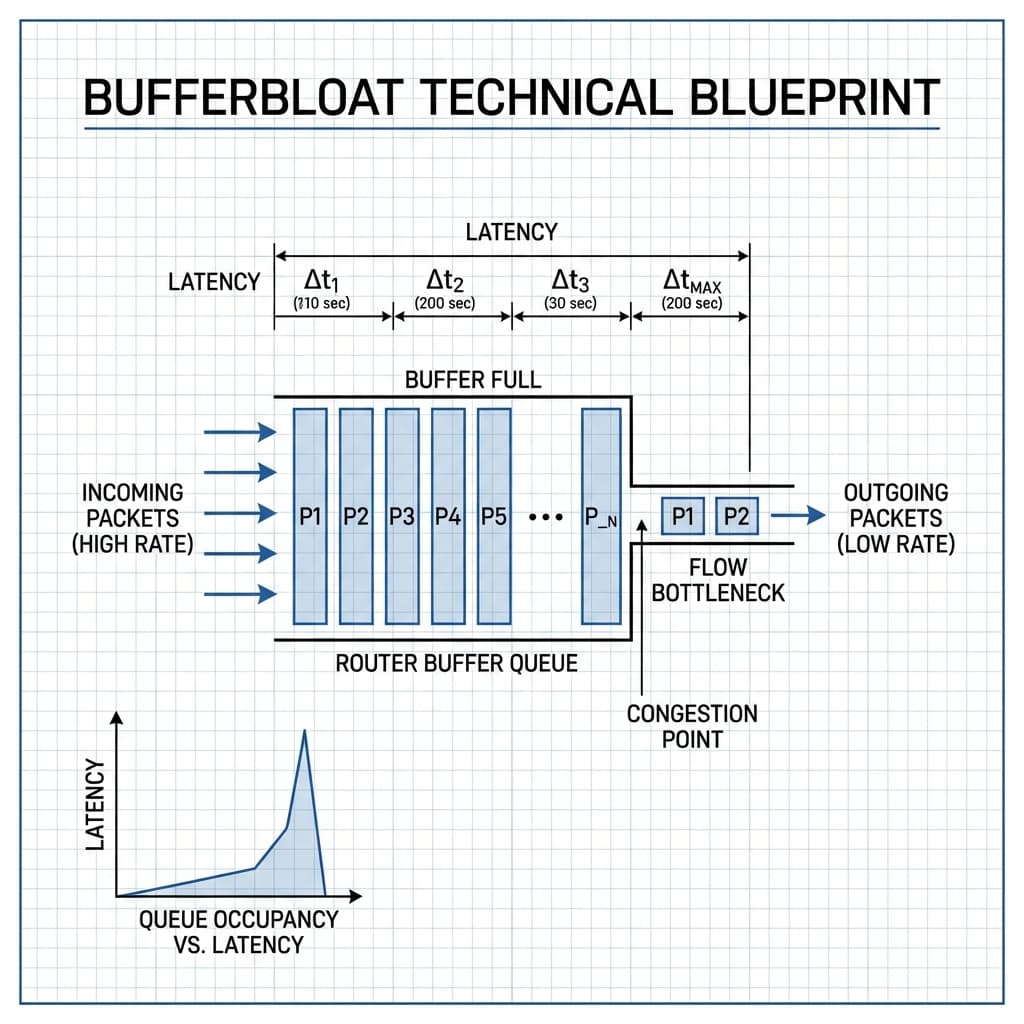
Bufferbloat & Queuing Dynamics
Narrative: High ingress traffic saturating the egress buffer.
Engineering Insight: When ingress traffic consistently exceeds the egress processing rate, the buffer builds up. This increases the total latency (). Once the buffer is full, Tail Drop occurs, leading to packet loss.
5. CORS Forensics: The Engineering of Trust
How does Pingdo measure latency to arbitrary domains (like Google or Cloudflare) from within your browser? This is a dance with **Cross-Origin Resource Sharing (CORS)**.
The Preflight Penalty
If we sent a standard `POST` request, the browser would first send an `OPTIONS` request (preflight). This would double the measured latency. Pingdo uses "Simple Requests" (GET/HEAD) to bypass preflight and measure the true first-byte latency.
Opaque Responses
For domains that don't explicitly allow `pingdo.net` via CORS, we use the `no-cors` mode. While we cannot read the *body* of the response, we can still measure the **duration** of the request. This is the core "hack" that allows browser-based pinging to work across the open web.
6. 60fps Telemetry: Canvas vs. DOM
Visualizing 10 pings per second with sub-millisecond updates is computationally expensive. Using standard React DOM elements (divs) for every data point would lead to massive **Main Thread Jitter**, where the act of drawing the graph actually slows down the measurement.
7. Technical Encyclopedia: Pingdo Internals
A timer that never moves backward, essential for delta calculations in a system with NTP updates.
Time To First Byte. The duration from request initiation to the first byte of response, capturing server processing delay.
A fetch mode that allows measuring the timing of a cross-origin request without full access to the response body.
Sending multiple independent HTTP requests over a single TCP/UDP connection to avoid handshake overhead.
A circular data structure that overwrites old data, providing O(1) insertions for real-time streams.
The initial OPTIONS request sent by browsers to verify CORS safety before a "Complex" request.
The W3C standard for exposing detailed network timing metrics to the browser runtime.
A temporary storage area that smooths out irregular packet arrivals for a steady visualization stream.
The process of attaching client-side JavaScript logic to a server-rendered HTML shell.
8. Conclusion: The Engineering of Transparency
Pingdo was built on a simple premise: **What you cannot measure, you cannot fix.** By bringing industrial-grade diagnostic principles to the browser, we empower engineers to see the "invisible" factors—jitter, bufferbloat, and application-layer bottlenecks—that define the modern web experience.
As a **Senior Maintenance Engineer**, my goal is to ensure that the tools we use are just as reliable as the systems they monitor. Pingdo is more than a dashboard; it is a commitment to technical transparency and the relentless pursuit of the perfect round-trip. **Physics defines the limits; engineering defines the experience.**
9. Performance Optimization Architecture: From Bundle Size to First Input Delay
The performance architecture of Pingdo's web application is engineered to deliver a sub-2-second Time to Interactive (TTI) even on low-end mobile devices with throttled CPU and network conditions. The foundation of this performance architecture is aggressive code splitting at the Next.js application level using React Server Components (RSC) and the App Router's streaming SSR capabilities. The initial page load includes only the critical rendering path: the article text, the navigation components, and the core CSS. The heavy visualization components—the real-time latency chart, the packet flow animations, and the WebGL-based heat maps—are deferred to separate JavaScript bundles that load asynchronously after the initial render. The JavaScript bundle for each visualization is typically 50-150 KB (gzipped), and loading it after the initial render adds 200-500 ms to the visualization's Time to Interactive on a 4G connection. This deferred loading architecture ensures that the article text is readable within 1 second of the page request, while the interactive visualizations become available within 2-3 seconds—a dramatic improvement over the "all or nothing" loading pattern of traditional single-page applications.
The rendering performance of the real-time latency visualization is optimized to maintain 60 frames per second (fps) even when 10 probes per second are generating 10 new data points per second. The chart rendering uses a double-buffering technique on the HTML5 Canvas: one canvas buffer is being drawn to by the JavaScript rendering loop while the other canvas buffer is being composited by the browser's rendering engine. The rendering loop runs at a fixed 60 fps using requestAnimationFrame (rAF) scheduling, which synchronizes the rendering with the browser's display refresh cycle. Each frame, the rendering loop reads the latest probe data from the ring buffer (described in the monitoring section), draws the new data points on the back buffer, and then swaps the front and back buffers using the Canvas 2D API's drawImage method. This double-buffering approach eliminates the screen tearing and visual artifacts that would occur if the rendering loop drew directly to the visible canvas while the browser was compositing a frame. The rendering performance is monitored using the built-in FPS counter, and if the frame rate drops below 50 fps, the rendering loop automatically reduces the data resolution by a factor of 2 (showing every other data point), trading visual precision for rendering speed to maintain the smooth user experience.
The memory management of the real-time visualization is another critical performance optimization. The latency chart displays a rolling window of the last 5 minutes of probe data (3,000 data points at 10 probes per second). Each data point is stored as a JavaScript object with timestamp, latency, jitter, and loss fields, consuming approximately 200 bytes per data point. The 5-minute rolling window stores 3,000 data points, consuming approximately 600 KB of memory for the primary visualization. However, each tab in the multi-probe view stores its own independent rolling window, and a user with 4 simultaneous probes consumes 2.4 MB of memory for the probe data alone. The total memory budget for the Pingdo visualization is 20 MB, which includes the probe data, the chart rendering buffers (two 1,200×400 pixel canvas buffers at 4 bytes per pixel = 3.8 MB each, total 7.6 MB), the animation textures for the packet flow visualization (approximately 4 MB), and the overhead of the React component tree (approximately 4-6 MB). If the memory usage exceeds 20 MB, the oldest probe data points are discarded more aggressively (reducing the rolling window from 5 minutes to 3 minutes), ensuring that the browser does not exceed the recommended maximum heap size of 64 MB for mobile devices with limited memory capacity.
The network performance of the Pingdo probing mechanism is optimized to minimize the impact of the probes on the user's connection. Each probe is an HTTP HEAD request to the target server, which generates approximately 1 KB of upstream traffic (the HTTP request headers) and 1 KB of downstream traffic (the HTTP response headers). At 10 probes per second, the total probe traffic is 20 KB/s (160 kbps), which is less than 1% of a typical 20 Mbps broadband connection. For users on metered connections (cellular data), the probe frequency is automatically reduced to 1 probe per second when the user's device detects that it is on a cellular network (using the Navigator.connection API's effectiveType property). The probe traffic is also optimized using HTTP/2 multiplexing: all probes to the same target server are sent over a single HTTP/2 connection, eliminating the TCP connection setup overhead (1 round trip) and the TLS handshake overhead (2 round trips) that would be incurred for each probe if HTTP/1.1 were used. The HTTP/2 connection is established when the first probe is sent and is maintained for the duration of the monitoring session, providing a persistent, low-overhead transport for the probe traffic that minimizes the impact on the user's network connection while maximizing the accuracy of the latency measurements.
The performance optimization of the Pingdo web application is not a one-time implementation effort but a continuous process of measurement, analysis, and improvement. The application includes a built-in performance telemetry system that collects Core Web Vitals metrics (Largest Contentful Paint LCP, First Input Delay FID, Cumulative Layout Shift CLS) from all user sessions and reports them to the development team's analytics platform. The team monitors the 75th percentile and 95th percentile of each metric across all users, and any regression that exceeds 10% of the baseline triggers an automated performance investigation ticket in the team's issue tracker. The performance budget for each deployment is defined in the CI/CD pipeline: the Lighthouse performance score must be 85 or higher, the bundle size must be 200 KB or less (gzipped, for the initial render JavaScript), and the Time to Interactive must be 2.5 seconds or less on a simulated 4G connection. If a deployment violates any of these performance budgets, the deployment is automatically rolled back to the previous version, and the developer who made the change receives a notification with the performance regression details. This automated performance governance ensures that every Pingdo release maintains the fast, responsive user experience that is essential for a network monitoring tool that is itself used to measure network performance.
10. Future Evolution: The Next Generation of Web-Based Network Diagnostics
The roadmap for Pingdo's evolution is driven by three technology trends that are reshaping network diagnostics: the increasing adoption of HTTP/3 and QUIC transport, the availability of WebTransport as a browser API for low-latency data streaming, and the emergence of WebAssembly (Wasm) as a platform for running high-performance network diagnostic code directly in the browser. The adoption of QUIC-based probes is the highest priority on the roadmap, as QUIC provides several advantages over HTTP/2 for latency measurement. QUIC connections are established with a 0-RTT handshake for returning users (compared to the 2-RTT handshake of TCP+TLS), which enables Pingdo to start probing immediately when the user opens the application, without waiting for the connection setup overhead. QUIC also provides connection migration: if the user's network changes (switching from Wi-Fi to cellular), the QUIC connection survives the network change without re-establishment, allowing Pingdo to continue probing without interruption. The implementation of QUIC-based probing requires the development of a QUIC-capable probe target server (since most web servers still do not support QUIC), which Pingdo is developing as an open-source reference implementation that will be available to the wider network diagnostic community.
WebTransport is a newer browser API that provides a more powerful alternative to HTTP-based probing for Pingdo's use case. WebTransport provides a multiplexed, bidirectional, low-latency data channel over QUIC, enabling Pingdo to send probe packets at a higher frequency (up to 100 probes per second) than is practical with HTTP/2 or HTTP/3 (which are designed for application-level requests rather than high-frequency probing). The WebTransport API provides sub-millisecond timing resolution for send and receive events, eliminating the timer rounding errors that affect the performance.now()-based measurements used in HTTP probing. WebTransport also supports unreliable datagrams (similar to UDP), which allows Pingdo to measure one-way latency and jitter without the overhead of reliable delivery, providing a more accurate measurement of the underlying network performance. The development of WebTransport-based probing is scheduled for the v2.0 release of Pingdo and will be initially available as an opt-in feature for users who are comfortable with the experimental nature of the WebTransport API (which is currently only available in Chromium-based browsers behind a feature flag).
WebAssembly is the third frontier technology that will transform Pingdo's diagnostic capabilities. The current probing implementation is written in JavaScript, which provides good performance for the 10-probes-per-second frequency but cannot achieve the microsecond-level timing precision that is required for high-frequency trading or data center latency measurement. By rewriting the probing engine in Rust and compiling it to WebAssembly, Pingdo can achieve deterministic, sub-microsecond timing precision that is limited only by the browser's ability to read the hardware clock. The Wasm-based probing engine runs as a separate thread using Web Workers, completely isolated from the main JavaScript thread, ensuring that the probing is not affected by the rendering, animation, or other application logic that executes on the main thread. The Wasm engine uses the WebAssembly System Interface (WASI) to access the browser's performance timers and network APIs directly, bypassing the JavaScript runtime's overhead. The implementation of Wasm-based probing is a research project that is expected to take 12-18 months to complete, as it requires significant development effort to port the probing algorithms from JavaScript to Rust and to optimize the Wasm binary for minimal download size (targeting under 100 KB gzipped).
The operational evolution of Pingdo includes the deployment of a global network of probe target servers that are strategically located in major internet exchange points, cloud provider regions, and IXP peering locations. The probe target network currently includes 50 servers in 30 cities across 20 countries, and the roadmap calls for expanding to 200 servers in 100 cities by 2027. Each probe target server is a lightweight HTTP server that responds to HEAD requests with minimal overhead (the response is generated in under 100 microseconds on the server). The probe target servers are deployed on bare-metal servers in colocation facilities and cloud providers, with redundant power, network connectivity, and DNS resolution to ensure 99.99% availability. The geographic distribution of the probe target servers enables Pingdo users to measure latency to destinations in their own region (which provides the most relevant measurement for their use case) as well as to destinations in other regions (which provides a comparative benchmark). The expansion of the probe target network is funded by Pingdo's enterprise subscription tier, which provides SLA-guaranteed probe target availability, dedicated probe target servers for enterprise customers, and integration with the customer's existing monitoring infrastructure.
The long-term vision for Pingdo is to become the de facto standard for web-based network diagnostics, providing engineers with the same diagnostic capability in the browser that they currently have on the command line, but with the additional benefits of collaborative sharing, historical trending, and AI-powered anomaly detection. The "Pingdo Network Diagnostic Protocol" (PNDP) is being developed as an open standard for browser-based network measurement that can be implemented by any web server, enabling the entire web to become a diagnostic network. The PNDP specification defines the HTTP headers, timing semantics, and privacy protections that enable any web server to participate as a probe target without compromising the security or performance of the web application. The PNDP standard is being submitted to the IETF as an informational RFC, and Pingdo is working with the W3C Web Performance Working Group to incorporate the PNDP timing semantics into the next version of the Resource Timing API. The combination of the PNDP open standard, the WebTransport enabling technology, and the Wasm performance engine will transform Pingdo from a single web application into a platform for web-based network diagnostics that any engineer, any application, and any organization can use to understand and improve the performance of their network connections.